Create the invoice
Select the customer, company, currency, payment terms and document type.
Free · open source · self-hosted
Create invoices, calculate taxes and discounts, print documents, match payments and keep customer debt visible in one flexible ERP.
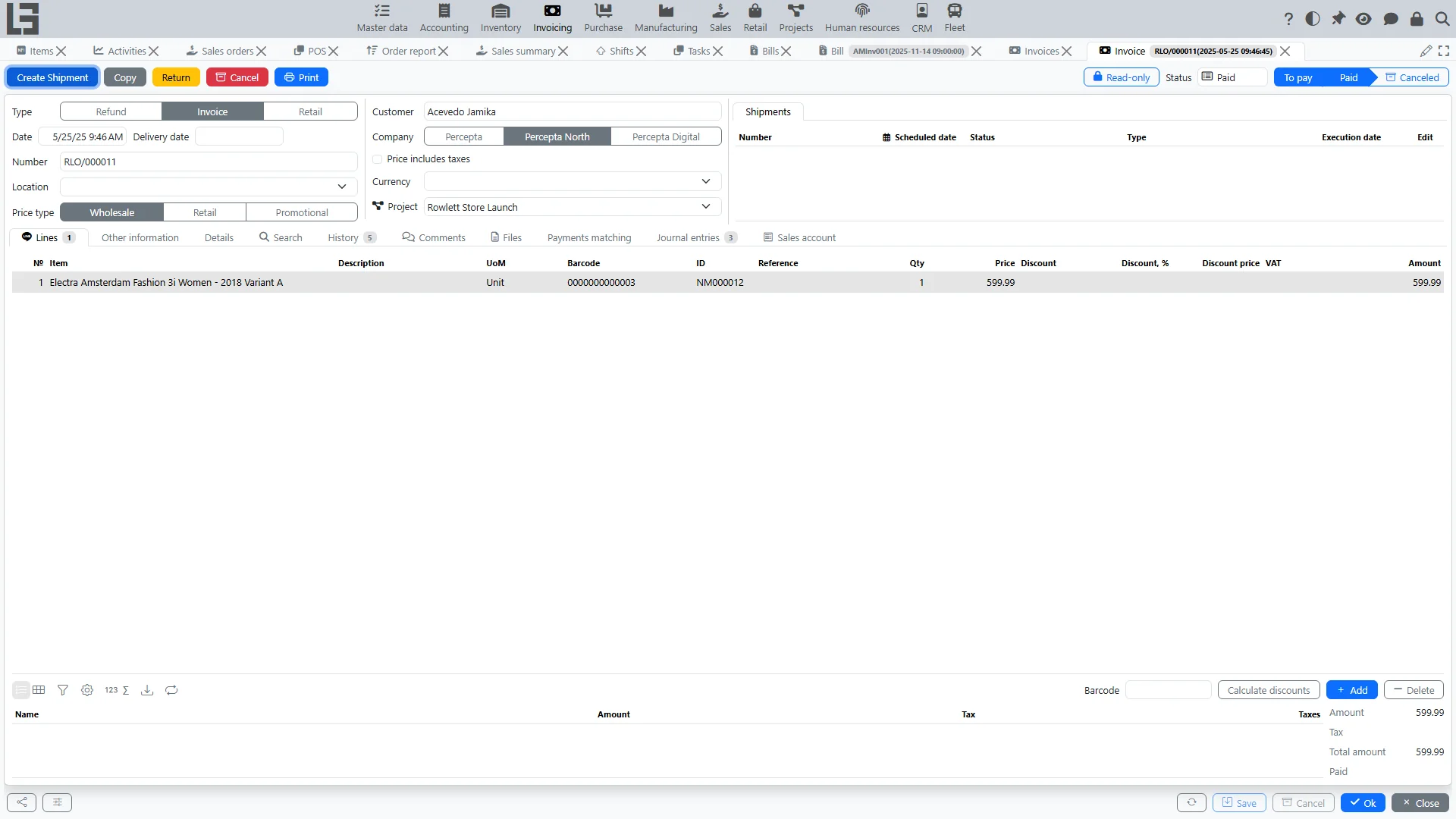 Real product interfaceOpen demo ↗
Invoice · document cardCaptured from the public MyCompany demo
From sale to settlement
Move from customer and line items to payment while taxes, status and related documents stay connected.
Select the customer, company, currency, payment terms and document type.
Enter products or services, quantities, prices, discounts and taxes.
Move the invoice through Draft and To pay, then generate the required document.
Match incoming payments, see the remaining debt and close the invoice.
Practical invoicing control
A working finance process for sales teams, accountants and business owners — already connected to ERP data.
Configure types, numbering, customers, companies, currencies, terms and references for your process.
Calculate line taxes, percentage or price discounts, totals and multi-currency amounts consistently.
Use Draft, To pay, Paid and Canceled states with comments, files and a full status timeline.
Match full or partial incoming payments and keep the unpaid balance visible until settlement.
Create shipments from invoices and check availability when the Inventory module is enabled.
Use configurable print templates, invoice reports, payment reports and the payment calendar.
One source of truth
MyCompany shares customers, products, orders, shipments, payments and accounting data across modules. No repeated entry and no fragile integration between separate tools.
Before you start
Review the source code, documentation and public demo before you decide.
Yes. MyCompany is open source under Apache 2.0, with no per-user or per-invoice license fee.
Yes. You can self-host MyCompany on Linux, Windows or Docker and keep business data under your control.
Yes. Invoice lines support taxes and discounts, while document types can define currency and price settings.
Yes. Incoming payments can be matched fully or partially, and the remaining balance stays visible until the invoice is settled.
Yes. With Inventory enabled, a confirmed invoice can create a shipment manually or automatically according to its type.
See the real workflow
Open the public demo and follow an invoice from customer and line items to payment and shipment.